Buy unblocksource.eu ?
We are moving the project
unblocksource.eu .
Are you interested in purchasing the domain
unblocksource.eu ?
domain@kv-gmbh.de · 0541-91531010
Buy unblocksource.eu ?
How do I configure the firewall on Linux Debian 10?
To configure the firewall on Linux Debian 10, you can use the built-in firewall management tool called 'ufw' (Uncomplicated Firewall). First, you need to install ufw if it is not already installed by running 'sudo apt install ufw'. Then, you can enable ufw by running 'sudo ufw enable' and configure the firewall rules using commands like 'sudo ufw allow <port>/<protocol>' to allow specific ports and protocols. Finally, you can check the status of the firewall and the rules you have set by running 'sudo ufw status'. **
How can one configure a WLAN router without having access data?
If you do not have access to the login credentials for your WLAN router, you can try resetting the router to its factory settings. This can usually be done by pressing and holding the reset button on the router for a certain amount of time. Once the router has been reset, you can then access the router's configuration page using the default login credentials, which are often found in the router's manual or on the manufacturer's website. From there, you can reconfigure the router with new login credentials. **


Similar search terms for Configure
Top-Angebote
Products related to Configure:
-
Inspired Living SecureStay Stainless Steel Portable Door Lock Extra Privacy & Travel Security SecureStay Stainless Steel Portable Door Lock Extra Privacy & Travel SecurityWhen youre halfway across the world in a hotel, apartment, or shared room, peace of mind starts at the door. The SecureStay Stainless Steel Portable Door Lock is a compact, easytouse security solution perfect for travelers, renters, or anyone who...26,47 $*Shipping: 0,00 $Secure redirect to the provider
-
Tools, Home & Hobby Honda CRV Retractable Cargo Cover Waterproof Privacy Trunk Security Shade Honda CRV Retractable Cargo Cover Waterproof Privacy Trunk Security ShadeKeep your cargo area private, organized, and protected wherever the road takes you. This Honda CRV cargo cover is custom designed for 20232025 CRV 5seater models, fitting neatly into the original trunk slots without drilling or tools. The flexible...179,97 $*Shipping: 0,00 $Secure redirect to the provider
-
Inspired Deals 433MHz Wireless Garage Door Keypad With Rolling Code Security And Dual Channel PIN Access 433MHz Wireless Garage Door Keypad With Rolling Code Security And Dual Channel PIN AccessEnjoy the freedom to enter your garage without carrying a key or handheld remote. This garage door keypad provides convenient PINbased access with two independent password sets, making it practical for families, staff, or shared properties....64,97 $*Shipping: 0,00 $Secure redirect to the provider
-
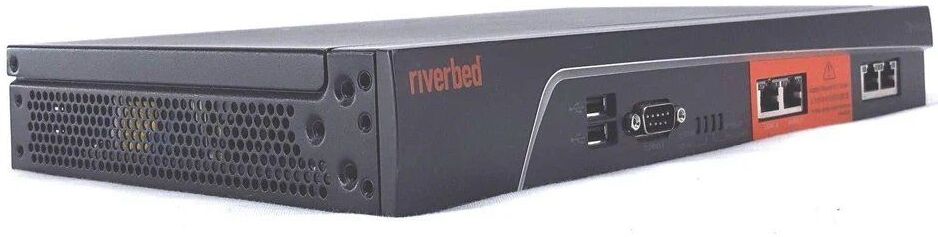
Riverbed Steelhead 250 Series Firewall SHA-00250-M, NewStep into enterprise network optimisation with the Riverbed Steelhead 250 Series (SHA-00250-M), a compact WAN acceleration appliance designed to improve application performance and reduce bandwidth usage across distributed networks. Built for branch offices and small-to-medium environments, it enhances data transfer speeds and user experience over WAN connections. ✔️ WAN Optimisation Technology – Accelerates applications and data transfer across wide-area networks for faster performance ✔️ Bandwidth Reduction (Up to 60–95%) – Minimises network traffic using data deduplication and compression ✔️ Application Acceleration – Improves performance for file sharing, email, web apps, and databases ✔️ 24/7 Enterprise Operation – Designed for continuous use in business environments ✔️ Compact Desktop Form Factor – Space-saving design suitable for branch offices and IT racks ✔️ Optimised TCP/UDP Handling – Enhances network efficiency and reduces latency ✔️ Integrated Bypass Ports – Maintains network availability even during power loss or failure ✔️ Low Power Consumption (~40W) – Efficient operation for always-on deployments ✔️ Supports Multiple Users & Sites – Scales for multi-branch connectivity and enterprise setups ✔️ Easy Deployment – Works without major changes to existing infrastructure or applications The Riverbed Steelhead 250 Series is designed for businesses that need faster application performance over WAN without upgrading bandwidth. Whether you're running remote offices, centralising servers, or improving cloud access, this appliance delivers proven optimisation and efficiency. Ideal for enterprise IT environments, it keeps your network fast, efficient, and cost-effective.63,99 £*Shipping: 0,00 £Secure redirect to the provider


-
How can one configure WhatsApp?
To configure WhatsApp, one needs to first download the app from the app store and install it on their device. Once installed, the user will need to open the app and verify their phone number by entering a code sent via SMS. After verification, the user can then set up their profile by adding a name, photo, and status. Additionally, users can customize their privacy settings, notification preferences, and chat settings to tailor the app to their preferences. **
-
How to configure a router?
To configure a router, you will need to access the router's web interface by typing its IP address into a web browser. You will then be prompted to enter the router's username and password, which is usually found on a sticker on the router itself. Once logged in, you can customize settings such as network name (SSID), password, security type, and other advanced settings like port forwarding and Quality of Service (QoS). Be sure to save your changes before exiting the web interface to ensure they take effect. **
-
How do I access the page 192.168.10.253 to configure my WLAN router?
To access the page 192.168.10.253 to configure your WLAN router, you need to open a web browser on a device connected to the same network as the router. In the address bar of the web browser, type in "192.168.10.253" and press Enter. This will take you to the login page of your router where you will need to enter the username and password to access the router's settings and configure it according to your preferences. **
-
How do you configure your computers?
I configure my computers by first setting up the operating system and ensuring all necessary drivers are installed. I then customize the settings to my preferences, such as display resolution, power options, and background images. I also install essential software and applications for my work and personal use. Finally, I make sure to regularly update the system and software to ensure optimal performance and security. **


How should I configure a MOC?
When configuring a MOC (Minimum Operating Configuration), you should first identify the essential components and functionalities required for the system to operate at a basic level. This includes determining the minimum hardware and software requirements, as well as any critical services or features that must be enabled. It is important to prioritize stability and reliability over additional features or performance enhancements in order to ensure the system can function under minimal conditions. Regular testing and validation of the MOC is also crucial to verify its effectiveness and identify any potential weaknesses. **
How do you configure a router?
To configure a router, you typically need to access its web interface by entering its IP address in a web browser. Once logged in, you can set up the router's network name (SSID), password, and security settings. You can also configure port forwarding, parental controls, and Quality of Service (QoS) settings. It's important to follow the manufacturer's instructions and best practices to ensure the router is properly configured for optimal performance and security. **
Top-Angebote
Products related to Configure:
-
Uplift Essentials Smart WiFi Garage Door Controller Remote Access & Security Alarm Hub Smart WiFi Garage Door Controller Remote Access & Security Alarm HubUpgrade your home with the ultimate convenience of a smart garage door opener that puts complete control in the palm of your hand. This intelligent controller transforms your existing garage motor into a hightech security asset, allowing you to...84,97 $*Shipping: 0,00 $Secure redirect to the provider
-
Cotril Styling Firewall Thermal Protective Spray 250mLA hair-care product for dry or dehydrated skin. Styling Firewall is a thermo-protective spray that protects hair from heat. This spray creates a film that surrounds the structure of the hair to prevent excessive dehydration and preserve color during drying. It seals the lengths and preserves the natural level of elasticity, shine and flexibility within them.14,59 £*Shipping: 6,86 £Secure redirect to the provider
-
Inspired Living SecureStay Stainless Steel Portable Door Lock Extra Privacy & Travel Security SecureStay Stainless Steel Portable Door Lock Extra Privacy & Travel SecurityWhen youre halfway across the world in a hotel, apartment, or shared room, peace of mind starts at the door. The SecureStay Stainless Steel Portable Door Lock is a compact, easytouse security solution perfect for travelers, renters, or anyone who...26,47 $*Shipping: 0,00 $Secure redirect to the provider
-
Tools, Home & Hobby Honda CRV Retractable Cargo Cover Waterproof Privacy Trunk Security Shade Honda CRV Retractable Cargo Cover Waterproof Privacy Trunk Security ShadeKeep your cargo area private, organized, and protected wherever the road takes you. This Honda CRV cargo cover is custom designed for 20232025 CRV 5seater models, fitting neatly into the original trunk slots without drilling or tools. The flexible...179,97 $*Shipping: 0,00 $Secure redirect to the provider
-
How do I configure the firewall on Linux Debian 10?
To configure the firewall on Linux Debian 10, you can use the built-in firewall management tool called 'ufw' (Uncomplicated Firewall). First, you need to install ufw if it is not already installed by running 'sudo apt install ufw'. Then, you can enable ufw by running 'sudo ufw enable' and configure the firewall rules using commands like 'sudo ufw allow <port>/<protocol>' to allow specific ports and protocols. Finally, you can check the status of the firewall and the rules you have set by running 'sudo ufw status'. **
-
How can one configure a WLAN router without having access data?
If you do not have access to the login credentials for your WLAN router, you can try resetting the router to its factory settings. This can usually be done by pressing and holding the reset button on the router for a certain amount of time. Once the router has been reset, you can then access the router's configuration page using the default login credentials, which are often found in the router's manual or on the manufacturer's website. From there, you can reconfigure the router with new login credentials. **
-
How can one configure WhatsApp?
To configure WhatsApp, one needs to first download the app from the app store and install it on their device. Once installed, the user will need to open the app and verify their phone number by entering a code sent via SMS. After verification, the user can then set up their profile by adding a name, photo, and status. Additionally, users can customize their privacy settings, notification preferences, and chat settings to tailor the app to their preferences. **
-
How to configure a router?
To configure a router, you will need to access the router's web interface by typing its IP address into a web browser. You will then be prompted to enter the router's username and password, which is usually found on a sticker on the router itself. Once logged in, you can customize settings such as network name (SSID), password, security type, and other advanced settings like port forwarding and Quality of Service (QoS). Be sure to save your changes before exiting the web interface to ensure they take effect. **
Similar search terms for Configure
-
Inspired Deals 433MHz Wireless Garage Door Keypad With Rolling Code Security And Dual Channel PIN Access 433MHz Wireless Garage Door Keypad With Rolling Code Security And Dual Channel PIN AccessEnjoy the freedom to enter your garage without carrying a key or handheld remote. This garage door keypad provides convenient PINbased access with two independent password sets, making it practical for families, staff, or shared properties....64,97 $*Shipping: 0,00 $Secure redirect to the provider
-
Riverbed Steelhead 250 Series Firewall SHA-00250-M, NewStep into enterprise network optimisation with the Riverbed Steelhead 250 Series (SHA-00250-M), a compact WAN acceleration appliance designed to improve application performance and reduce bandwidth usage across distributed networks. Built for branch offices and small-to-medium environments, it enhances data transfer speeds and user experience over WAN connections. ✔️ WAN Optimisation Technology – Accelerates applications and data transfer across wide-area networks for faster performance ✔️ Bandwidth Reduction (Up to 60–95%) – Minimises network traffic using data deduplication and compression ✔️ Application Acceleration – Improves performance for file sharing, email, web apps, and databases ✔️ 24/7 Enterprise Operation – Designed for continuous use in business environments ✔️ Compact Desktop Form Factor – Space-saving design suitable for branch offices and IT racks ✔️ Optimised TCP/UDP Handling – Enhances network efficiency and reduces latency ✔️ Integrated Bypass Ports – Maintains network availability even during power loss or failure ✔️ Low Power Consumption (~40W) – Efficient operation for always-on deployments ✔️ Supports Multiple Users & Sites – Scales for multi-branch connectivity and enterprise setups ✔️ Easy Deployment – Works without major changes to existing infrastructure or applications The Riverbed Steelhead 250 Series is designed for businesses that need faster application performance over WAN without upgrading bandwidth. Whether you're running remote offices, centralising servers, or improving cloud access, this appliance delivers proven optimisation and efficiency. Ideal for enterprise IT environments, it keeps your network fast, efficient, and cost-effective.63,99 £*Shipping: 0,00 £Secure redirect to the provider
-
Drop Dash Deals Rubber Grommet Assortment Kit For Wiring Firewall Hole Plug Protection Rubber Grommet Assortment Kit For Wiring Firewall Hole Plug ProtectionKeep wires protected, sealed, and neatly finished with this 170 pc of rubber grommet assortment kit. Designed for DIY repairs, auto work, electrical wiring, and shop use, this 170piece set gives you multiple sizes in one organized kit. Each firewall...50,97 $*Shipping: 0,00 $Secure redirect to the provider
-
Fusion Finds Portable Travel Door Lock Extra Security Privacy Lock For Hotels, Apartments & Home Portable Travel Door Lock Extra Security Privacy Lock For Hotels, Apartments & HomeEnjoy greater peace of mind wherever you stay. This portable travel door lock adds an extra layer of protection to hotel rooms, apartments, dorms, and rental properties, helping you feel safer and more secure. Designed for travelers, solo...29,97 $*Shipping: 0,00 $Secure redirect to the provider
-
How do I access the page 192.168.10.253 to configure my WLAN router?
To access the page 192.168.10.253 to configure your WLAN router, you need to open a web browser on a device connected to the same network as the router. In the address bar of the web browser, type in "192.168.10.253" and press Enter. This will take you to the login page of your router where you will need to enter the username and password to access the router's settings and configure it according to your preferences. **
-
How do you configure your computers?
I configure my computers by first setting up the operating system and ensuring all necessary drivers are installed. I then customize the settings to my preferences, such as display resolution, power options, and background images. I also install essential software and applications for my work and personal use. Finally, I make sure to regularly update the system and software to ensure optimal performance and security. **
-
How should I configure a MOC?
When configuring a MOC (Minimum Operating Configuration), you should first identify the essential components and functionalities required for the system to operate at a basic level. This includes determining the minimum hardware and software requirements, as well as any critical services or features that must be enabled. It is important to prioritize stability and reliability over additional features or performance enhancements in order to ensure the system can function under minimal conditions. Regular testing and validation of the MOC is also crucial to verify its effectiveness and identify any potential weaknesses. **
-
How do you configure a router?
To configure a router, you typically need to access its web interface by entering its IP address in a web browser. Once logged in, you can set up the router's network name (SSID), password, and security settings. You can also configure port forwarding, parental controls, and Quality of Service (QoS) settings. It's important to follow the manufacturer's instructions and best practices to ensure the router is properly configured for optimal performance and security. **
* All prices are inclusive of VAT and, if applicable, plus shipping costs. The offer information is based on the details provided by the respective shop and is updated through automated processes. Real-time updates do not occur, so deviations can occur in individual cases. ** Note: Parts of this content were created by AI.