Buy unblocksource.eu ?
We are moving the project
unblocksource.eu .
Are you interested in purchasing the domain
unblocksource.eu ?
domain@kv-gmbh.de · 0541-91531010
Buy unblocksource.eu ?
How does Orbot ensure anonymity and security?
Orbot ensures anonymity and security by routing internet traffic through the Tor network, which encrypts and bounces the data through a series of relays to hide the user's IP address and location. This helps to prevent websites and online services from tracking the user's online activities. Orbot also allows users to access websites and services that may be blocked in their region, further enhancing their privacy and security online. Additionally, Orbot can be used in conjunction with other privacy tools, such as VPNs, to provide an extra layer of protection. **
How can I access the network drive?
To access the network drive, you will need to be connected to the same network as the drive. Once connected, you can typically access the network drive by opening File Explorer on a Windows computer or Finder on a Mac. In the address bar, type the network drive's address or IP, and then enter your username and password if prompted. You should then be able to view and access the files stored on the network drive. **


Similar search terms for Drive
Top-Angebote
Products related to Drive:
-
eufy Security SoloCam E42 2-Cam Kit (HomeBase S380) + 1 TB Hard DriveUltra HD 4K Clarity: Features true 4K UHD resolution to capture every detail around your home. It can even recognize license plates up to 33 ft (10m) away. AI Motion Detection and Smart Tracking: Built-in AI instantly detects and automatically tracks people, vehicles, or important events within view, minimizing false alarms and keeping your property secure. PTZ Protection with No Blind Spots: Enjoy comprehensive coverage with a wide viewing angle, minimizing blind spots and allowing you to monitor your front porch, yard, or even your driveway. Motion-Activated Siren: Protect your home with a powerful, motion-activated strobe light that scares off unwanted visitors and gives you instant notifications about suspicious activity. Always-On Security with SolarPlus™ 2.0 Technology: Just 2 hours of direct sunlight daily keeps your camera fully charged for continuous, maintenance-free operation in any weather. No Monthly Fee: Supports up to 128 GB of microSD storage to keep your footage private—no subscription fees. Note: microSD card not included.324,99 £*Shipping: 0,00 £Secure redirect to the provider
-
Drop Dash Deals Phase Variable Frequency Drive VFD Speed Controller Motor Drive Phase Variable Frequency Drive VFD Speed Controller Motor DriveStart taking full control of your industrial and workshop motors with this powerful 1 pc of Variable Frequency Drive motor controller designed for precision and reliability. Ideal for machinists, fabricators, and automation enthusiasts, this 1.5kW...239,97 $*Shipping: 0,00 $Secure redirect to the provider
-
Eufy Video Doorbell S4 (Wired)+NVR Security System E50 with 2TB Hard Drive+Wi-Fi ModuleIncludes: Anker eufy S4 Smart Video Doorbell with Chime 2 (Wired), NVR Security System E50 with 2TB Hard Drive, eufy Wi-Fi Module. Anker eufy S4 Smart Video Doorbell with Chime 2 (Wired): Get a 180° View of Your Doorstep in Panoramic Mode; OmniTrack™ AI Tracking and Auto-Framing; 9 MP Ultra HD with Color Night Vision; Wired Power and Smart Home Integration; Hear Every Ring. NVR Security System E50 with 2TB Hard Drive: Hybrid Bullet-PTZ Dual-Lens Camera; eufy OmniTrack™ Focuses on What Matters; Live Cross-Cam Tracking; On-Device AI Agent; Free AI-Powered Video Finder; 24/7 Recording, Expandable Security. eufy Wi-Fi Module: Seamless Integration with the eufy Ecosystem; Unified Device Management; Unlock NVR Features for Wi-Fi Cameras; Plug-and-Play Simplicity; One-Click Migration for Easy Transfer.939,98 £*Shipping: 0,00 £Secure redirect to the provider
-
Uplift Essentials Smart WiFi Garage Door Controller Remote Access & Security Alarm Hub Smart WiFi Garage Door Controller Remote Access & Security Alarm HubUpgrade your home with the ultimate convenience of a smart garage door opener that puts complete control in the palm of your hand. This intelligent controller transforms your existing garage motor into a hightech security asset, allowing you to...84,97 $*Shipping: 0,00 $Secure redirect to the provider


-
How can I not access drive C?
To prevent access to drive C, you can set up user permissions or use third-party software to restrict access to the drive. You can also hide the drive by changing its properties in the Windows settings. Additionally, you can encrypt the drive or set up a password to access it, adding an extra layer of security. **
-
How can I not access a drive?
To not access a drive, you can remove the drive from the computer or disconnect it from the system. If the drive is internal, you can also disable it in the computer's BIOS settings. Additionally, you can set up user permissions or encryption to restrict access to the drive for specific users or groups. Finally, you can physically lock the drive using a security lock or enclosure to prevent unauthorized access. **
-
Can't access the video in iCloud Drive?
If you are unable to access a video in iCloud Drive, there may be a few reasons for this. First, ensure that you are logged into the correct iCloud account and that your internet connection is stable. If the video is not appearing in your iCloud Drive, it's possible that it was not properly uploaded or synced to the cloud. Try re-uploading the video or checking the upload status to ensure it was successful. Additionally, make sure that the video file format is supported by iCloud Drive. If you continue to experience issues, consider reaching out to Apple Support for further assistance. **
-
Can Windows not access the hard drive?
Yes, Windows may not be able to access a hard drive for several reasons. This could be due to a hardware issue with the hard drive itself, a problem with the file system, or a driver issue. Additionally, if the hard drive is encrypted or has been formatted with a file system that Windows does not support, it may not be accessible. In such cases, troubleshooting steps such as checking the connections, running disk diagnostics, or updating drivers may be necessary to resolve the issue. **

How do I access my drive D?
To access your drive D, you can open File Explorer by clicking on the folder icon in the taskbar or by pressing the Windows key + E. Once File Explorer is open, you should see a list of drives on the left-hand side. Look for the drive labeled "D:" and click on it to access the contents of the drive. If you don't see the drive listed, it's possible that it may be hidden or not properly connected to your computer. **
How can I access another hard drive?
To access another hard drive, you can connect it to your computer either internally or externally. If the hard drive is internal, you can open your computer and connect it to an available SATA port on the motherboard. If the hard drive is external, you can use a USB cable to connect it to your computer. Once connected, the hard drive should appear as a new drive in your file explorer, allowing you to access its contents. Keep in mind that you may need to format the drive or assign it a drive letter before it can be used. **
Top-Angebote
Products related to Drive:
-
Anker eufy NVR Security System E50 with 2TB Hard DriveHybrid Bullet-PTZ Dual-Lens Camera: The upper 2K wide-angle lens delivers a 122° fixed view of the area, while the lower 4K Pan-Tilt-Zoom tracks 360° for complete coverage and features 5× auto-zoom to capture details up to 20 m away. eufy OmniTrack™ Focuses on What Matters: When the bullet cam detects activity, the Pan-Tilt-Zoom cam locks on and auto-tracks them, keeping the action centred with intelligent auto-framing. Live Cross-Cam Tracking: Advanced cross-camera tracking seamlessly follows the action across multiple cameras when used with eufy NVR. On-Device AI Agent: Upgrade to smart, real-time security with a local AI agent that enables instant analysis, genuine threat identification, and decisive action for secure, cloud-free security and no monthly fee. Customisable No-Go Zones and alerts empower your security system to accurately detect real danger and ensure tailored responses. Free AI-Powered Video Finder: Instantly find what you're looking for by searching with keywords on the eufy app to avoid scrolling through hours of footage. 24/7 Recording, Expandable Security: The 8-port NVR supports up to 8 cameras and is expandable to 16 channels via a PoE switch. The pre-installed 2TB HDD (expandable to 16TB) ensures continuous 24/7 local recording. Add more eufy PoE cameras to expand wired coverage, or connect Wi-Fi cameras via eufy Wi-Fi Module (sold separately) to expand your coverage.679,00 £*Shipping: 0,00 £Secure redirect to the provider
-
All Categories Goods Drive Impact Universal Joint Cr Mo Swivel Socket Adapter For Tight Access Drive Impact Universal Joint Cr Mo Swivel Socket Adapter For Tight AccessWhen a stubborn fastener sits at the wrong angle, the right tool makes all the difference. This 12 approx drive impact universal joint is built for mechanics, DIYers, and garage pros who need stronger access in tight or awkward spaces. Made from...45,97 $*Shipping: 0,00 $Secure redirect to the provider
-
eufy Security SoloCam E42 2-Cam Kit (HomeBase S380) + 1 TB Hard DriveUltra HD 4K Clarity: Features true 4K UHD resolution to capture every detail around your home. It can even recognize license plates up to 33 ft (10m) away. AI Motion Detection and Smart Tracking: Built-in AI instantly detects and automatically tracks people, vehicles, or important events within view, minimizing false alarms and keeping your property secure. PTZ Protection with No Blind Spots: Enjoy comprehensive coverage with a wide viewing angle, minimizing blind spots and allowing you to monitor your front porch, yard, or even your driveway. Motion-Activated Siren: Protect your home with a powerful, motion-activated strobe light that scares off unwanted visitors and gives you instant notifications about suspicious activity. Always-On Security with SolarPlus™ 2.0 Technology: Just 2 hours of direct sunlight daily keeps your camera fully charged for continuous, maintenance-free operation in any weather. No Monthly Fee: Supports up to 128 GB of microSD storage to keep your footage private—no subscription fees. Note: microSD card not included.324,99 £*Shipping: 0,00 £Secure redirect to the provider
-
Drop Dash Deals Phase Variable Frequency Drive VFD Speed Controller Motor Drive Phase Variable Frequency Drive VFD Speed Controller Motor DriveStart taking full control of your industrial and workshop motors with this powerful 1 pc of Variable Frequency Drive motor controller designed for precision and reliability. Ideal for machinists, fabricators, and automation enthusiasts, this 1.5kW...239,97 $*Shipping: 0,00 $Secure redirect to the provider
-
How does Orbot ensure anonymity and security?
Orbot ensures anonymity and security by routing internet traffic through the Tor network, which encrypts and bounces the data through a series of relays to hide the user's IP address and location. This helps to prevent websites and online services from tracking the user's online activities. Orbot also allows users to access websites and services that may be blocked in their region, further enhancing their privacy and security online. Additionally, Orbot can be used in conjunction with other privacy tools, such as VPNs, to provide an extra layer of protection. **
-
How can I access the network drive?
To access the network drive, you will need to be connected to the same network as the drive. Once connected, you can typically access the network drive by opening File Explorer on a Windows computer or Finder on a Mac. In the address bar, type the network drive's address or IP, and then enter your username and password if prompted. You should then be able to view and access the files stored on the network drive. **
-
How can I not access drive C?
To prevent access to drive C, you can set up user permissions or use third-party software to restrict access to the drive. You can also hide the drive by changing its properties in the Windows settings. Additionally, you can encrypt the drive or set up a password to access it, adding an extra layer of security. **
-
How can I not access a drive?
To not access a drive, you can remove the drive from the computer or disconnect it from the system. If the drive is internal, you can also disable it in the computer's BIOS settings. Additionally, you can set up user permissions or encryption to restrict access to the drive for specific users or groups. Finally, you can physically lock the drive using a security lock or enclosure to prevent unauthorized access. **
Similar search terms for Drive
-
Eufy Video Doorbell S4 (Wired)+NVR Security System E50 with 2TB Hard Drive+Wi-Fi ModuleIncludes: Anker eufy S4 Smart Video Doorbell with Chime 2 (Wired), NVR Security System E50 with 2TB Hard Drive, eufy Wi-Fi Module. Anker eufy S4 Smart Video Doorbell with Chime 2 (Wired): Get a 180° View of Your Doorstep in Panoramic Mode; OmniTrack™ AI Tracking and Auto-Framing; 9 MP Ultra HD with Color Night Vision; Wired Power and Smart Home Integration; Hear Every Ring. NVR Security System E50 with 2TB Hard Drive: Hybrid Bullet-PTZ Dual-Lens Camera; eufy OmniTrack™ Focuses on What Matters; Live Cross-Cam Tracking; On-Device AI Agent; Free AI-Powered Video Finder; 24/7 Recording, Expandable Security. eufy Wi-Fi Module: Seamless Integration with the eufy Ecosystem; Unified Device Management; Unlock NVR Features for Wi-Fi Cameras; Plug-and-Play Simplicity; One-Click Migration for Easy Transfer.939,98 £*Shipping: 0,00 £Secure redirect to the provider
-
Uplift Essentials Smart WiFi Garage Door Controller Remote Access & Security Alarm Hub Smart WiFi Garage Door Controller Remote Access & Security Alarm HubUpgrade your home with the ultimate convenience of a smart garage door opener that puts complete control in the palm of your hand. This intelligent controller transforms your existing garage motor into a hightech security asset, allowing you to...84,97 $*Shipping: 0,00 $Secure redirect to the provider
-
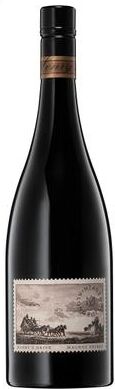
"""Henry's Drive""" """Henry's Drive Magnus Shiraz 2019 Red Wine - Australia""""""The Henry’s Drive Magnus Shiraz has a complex aroma spectrum of lavender, thyme and star anise. The palate is packed with dark brooding fruits entwined with blackberry, dark chocolate and licorice. A beautifully balanced wine supported by seamless..."78,99 $*Shipping: 0,00 $Secure redirect to the provider
-
Can't access the video in iCloud Drive?
If you are unable to access a video in iCloud Drive, there may be a few reasons for this. First, ensure that you are logged into the correct iCloud account and that your internet connection is stable. If the video is not appearing in your iCloud Drive, it's possible that it was not properly uploaded or synced to the cloud. Try re-uploading the video or checking the upload status to ensure it was successful. Additionally, make sure that the video file format is supported by iCloud Drive. If you continue to experience issues, consider reaching out to Apple Support for further assistance. **
-
Can Windows not access the hard drive?
Yes, Windows may not be able to access a hard drive for several reasons. This could be due to a hardware issue with the hard drive itself, a problem with the file system, or a driver issue. Additionally, if the hard drive is encrypted or has been formatted with a file system that Windows does not support, it may not be accessible. In such cases, troubleshooting steps such as checking the connections, running disk diagnostics, or updating drivers may be necessary to resolve the issue. **
-
How do I access my drive D?
To access your drive D, you can open File Explorer by clicking on the folder icon in the taskbar or by pressing the Windows key + E. Once File Explorer is open, you should see a list of drives on the left-hand side. Look for the drive labeled "D:" and click on it to access the contents of the drive. If you don't see the drive listed, it's possible that it may be hidden or not properly connected to your computer. **
-
How can I access another hard drive?
To access another hard drive, you can connect it to your computer either internally or externally. If the hard drive is internal, you can open your computer and connect it to an available SATA port on the motherboard. If the hard drive is external, you can use a USB cable to connect it to your computer. Once connected, the hard drive should appear as a new drive in your file explorer, allowing you to access its contents. Keep in mind that you may need to format the drive or assign it a drive letter before it can be used. **
* All prices are inclusive of VAT and, if applicable, plus shipping costs. The offer information is based on the details provided by the respective shop and is updated through automated processes. Real-time updates do not occur, so deviations can occur in individual cases. ** Note: Parts of this content were created by AI.